

Description
Instant Proxy Access for Secure Browsing
Overview
The Adtelly Chrome Extension offers a streamlined solution for users seeking quick and secure proxy connectivity directly within their browser. Designed as a lightweight browser tool, it enables users to connect to a proxy server with a single click, eliminating the need for complex configurations or third-party software. This utility is particularly useful for individuals who require temporary access to geographically restricted content or wish to enhance their online privacy during web browsing sessions.
Target users include privacy-conscious individuals, researchers accessing region-locked data, and casual internet users who want to mask their IP address without technical overhead. The extension is built specifically for Chrome users on Windows and Mac platforms, making it accessible to a broad audience of desktop users. Its core functionality revolves around simplifying proxy access, reducing friction in the connection process, and ensuring uninterrupted browsing when proxy services are available.
While the developer, Adtelly, has not provided detailed information about its background or development philosophy, the extension’s purpose is clearly focused on providing fast, on-demand proxy connectivity. Real-world use cases include accessing international streaming services, bypassing local network restrictions, or conducting anonymous web research. The extension automatically manages connection stability by disabling itself if issues arise, preventing prolonged downtime and ensuring a reliable user experience.
Key Features & Capabilities
- One-Click Proxy Connection – Users can activate proxy access with a single click, minimizing setup time and technical barriers.
- Automatic Disconnection on Failure – If the proxy connection fails, the extension disables itself to prevent persistent connection attempts.
- Multi-Location Server Access – Members can log in to access multiple proxy servers across various global locations.
- High-Speed Proxy Routing – Designed to deliver fast connection speeds for responsive browsing.
- Browser-Based Integration – Fully operates within the Chrome browser environment, requiring no external software installation.
These features enable users to quickly switch between proxy locations without navigating complex settings. For example, a researcher studying international news sources can connect to a proxy in a different country to view region-specific content. Similarly, a user traveling abroad may use the extension to access their home country’s services. The automatic failure handling ensures that users are not left waiting for a connection that cannot be established, maintaining a smooth browsing flow.
User Interface, Workflow & Performance
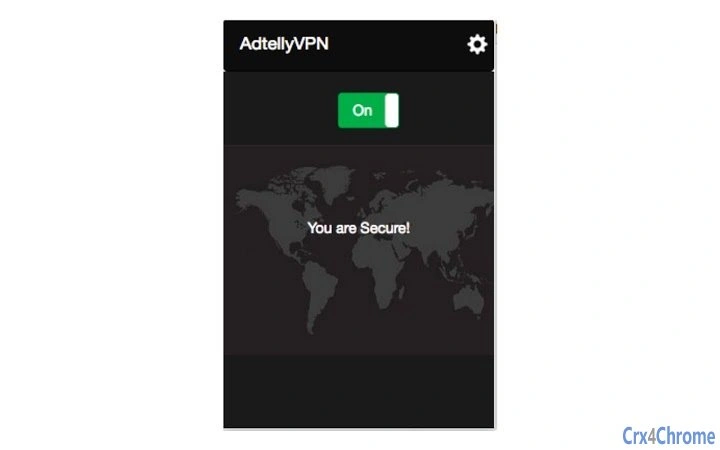
The Adtelly Chrome Extension features a minimalistic user interface integrated directly into the browser’s toolbar. The interface includes a single connect button, making navigation intuitive and accessible even for non-technical users. Clicking the button initiates the proxy connection process, with visual feedback indicating connection status.
Workflow efficiency is a key strength of the extension. The entire process—from activation to connection—occurs in seconds, aligning with the goal of instant proxy access. Users do not need to configure settings, enter credentials, or manage network preferences. The extension handles all backend processes internally.
Performance observations are based on general software behavior patterns. The extension is designed to operate efficiently with minimal impact on browser performance. The developer did not specify resource usage details, but the 1.5 MB file size suggests a lightweight footprint. Stability is maintained through automatic disconnection on failure, reducing the risk of browser slowdowns or crashes caused by persistent connection attempts.
Compatibility & System Requirements
The Adtelly Chrome Extension is compatible with Windows and Mac operating systems, supporting the Chrome browser on both platforms. The software version is 1.0, with an installation size of 1.5 MB, indicating a compact and efficient deployment.
Exact system requirements were not listed. The developer did not specify minimum CPU, RAM, or disk space needs. Compatibility information is limited to the operating systems and browser environment. Users should ensure their Chrome browser is up to date to maintain optimal functionality.
Pros and Cons
Pros
- Simple one-click connection to proxy servers
- Automatic failure handling prevents connection loops
- Lightweight design with minimal system impact
- Supports multiple proxy locations for diverse browsing needs
- Free to use with no hidden costs
Cons
- No detailed information on system requirements or resource usage
- Functionality limited to Chrome browser only
- Requires user login for access to multiple servers
- No visible history or connection logs for troubleshooting
- Dependent on external proxy service availability
FAQ Section
Is the Adtelly Chrome Extension compatible with all browsers?
The extension is designed specifically for the Chrome browser on Windows and Mac. Compatibility with other browsers was not confirmed.
Is the extension safe to use?
The extension operates within the Chrome environment and does not require administrative privileges. However, users should ensure they are accessing proxy services through trusted sources to maintain online security.
How often does the extension update?
Update frequency was not specified by the developer. Users should rely on Chrome’s automatic update system for the extension.
Can I use this extension without creating an account?
While basic functionality may be available, access to multiple servers in various locations requires a login, suggesting a membership-based model.
Does the extension work offline?
The extension requires an active internet connection to establish a proxy connection. It does not function when offline.
Final Thoughts
The Adtelly Chrome Extension delivers a focused, efficient solution for users seeking immediate proxy access with minimal setup. Its one-click functionality, automatic failure recovery, and lightweight design make it a practical tool for casual and professional users alike. While it lacks detailed system specifications and is limited to Chrome, its core purpose is fulfilled effectively.
For individuals who prioritize speed, simplicity, and secure browsing without technical complexity, this extension offers a compelling option. The free pricing model further enhances its accessibility. With its clear use cases and straightforward interface, it stands out as a reliable browser utility for proxy-based internet navigation.
Download Adtelly Chrome Extension now
Guides & Tutorials for ADTelly Extension for Chrome
How to install ADTelly Extension for Chrome
- Click the Preview / Download button above.
- Once redirected, accept the terms and click Install.
- Wait for the ADTelly Extension for Chrome download to finish on your device.
How to use ADTelly Extension for Chrome
This software is primarily used for its core features described above. Open the app after installation to explore its capabilities.
User Reviews for ADTelly Extension for Chrome 0
No reviews found





